
Chase’s completely insecure and broken “secure” document exchange system (aka securedx, secure-dx)
A few days ago, I got a call from my girlfriend, Olivia. I was so deep in working on my startup, Parse.ly, that I hadn’t checked my bank account statements in several weeks. We just went into private beta last Thursday, after DreamIt Demo Day. She noticed some suspicious charges, and so I looked into them. Indeed, it looked like I had been a victim of fraud: there were three charges that clearly was not me.
I immediately called Chase Customer Service. In order to confirm the details about my account, the representative needed me to identify the fraudulent charges, but also identify charges that were actually valid. For this latter bit, I needed to identify the time/place of a specific transaction. This card was mostly used for online auto bill payments, so this turned out to be impossible for any of my last 20 valid payments. Yet the customer service rep insisted that I name a time and place. I told her, “The time and place was whenever the server for this system decided to automatically bill my account. I don’t know where their server is, I don’t know what time their cron jobs run.”
“Cron jobs?” she said.
Right, I had been hanging around techies at DreamIt Ventures for too long. “Listen, the transaction didn’t take place physically, it took place digitally. I can identify one transaction, which is about a month old, where I actually used the card in-person to buy something.” She finally understood and let me move on.
Burak from Trendsta said he felt bad for me, for how patient I had to be with this person. But that was the least of it. This little technical misunderstanding was nothing compared to what followed.
I was told that in order to get a credit back from my account, they had to collect from me a signed affidavit indicating the charges were fraudulent. This affadavit would be “securely shared” with me via e-mail. OK, “sounds good” I said. I waited around for the e-mail to come in.
Finally, two e-mails arrived in my inbox. The important bits are in red. First:
Message from Chase Customer Claims Secure Document Exchange
From: chase_customer_claims@secure-dx.com
Welcome to the Chase Customer Claims Secure Document Exchange. You recently contacted Chase regarding your claim number XXXX. Your documents are available for your review.
Per our telephone conversation, you will need to register to our secure website.
Your initial password is: passwordYour initial user name has been sent to you in a separate email.
On your first log in, you will be required to select a new password.
Thank you for using Chase Customer Claims Secure Document Exchange.
To contact Chase for claim related questions or to withdraw your claim, please call 1-866-564-2262.
Any geek reading this will immediately identify some key things wrong with this e-mail that make it look like a total phishing expedition. Namely:
- The e-mail address, rather than being from a chase.com domain, was from a strange domain named “secure-dx.com”.
- Rather than sending a cryptographically secure, expiring activation link, a default password was sent in plain text.
- To make matters worse, the password is the same for all users, and thus anyone who can guess my e-mail address can easily impersonate me on this “secure document” website.
- The default password is “password”. WTF?! I mean, c’mon?
I didn’t quite understand why I needed a “second e-mail” now, but I opened it up. Here it is, excerpted:
Your Chase Customer Claims Secure Document Exchange Electronic Package is available online
From: chase_customer_claims@secure-dx.com
ANDREW MONTALENTI,
Welcome to the Chase Customer Claims Secure Document Exchange.You recently contacted Chase regarding your claim number XXXX. Your documents are available for your review.
Per our telephone conversation, you will need to register to our secure website by clicking on the link below or copy and paste the link into your browser’s address bar.
https://chase.secure-dx.com/consumerdcx-chase_atm
Your user name is my.email@hidden.com
Your initial password has been sent to you in a separate email
On your first log in, you will be required to select a new password. NOTE: This site is different from Chase.com and passwords are not related. Updating your password on Chase Customer Claims Secure Document Exchange will have no impact on established Chase.com passwords.
Once registered, you will be able to access your customer correspondence on our secure website. You may be offered the option to complete and sign the form online if you wish to do so. [...]
To say I was confused would be a major understatement. I was downright depressed.
My guess is that the engineers at Chase thought that by separating the “password e-mail” from the “user e-mail”, that somehow made the whole communication more secure. Two e-mails are better than one, right?
The most important thing to point to is the link. The link where this secure communication will happen is not at the chase.com domain Instead, it is at https://chase.secure-dx.com/consumerdcx-chase_atm. There is no way, NO WAY this is a real Chase site, I think.
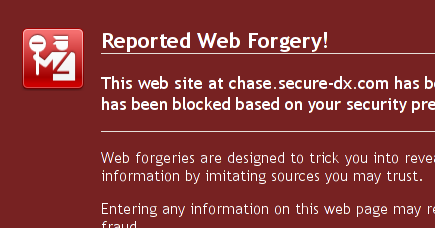
I click on the link and in Firefox, I see this:
![]()
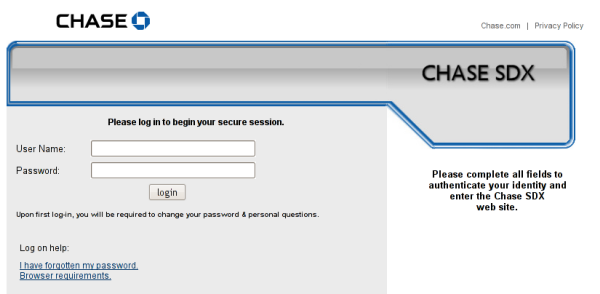
At this point, my paranoid self turns on. Curious, I click through the link anyway. And I see this:
![]()
Now I’m really paranoid. Links off secure-dx.com pointing back to chase.com’s privacy policy. A username and password box and a sort of hokey imitation of the Chase.com web design. I realize, holy shit, I’m being duped! Not just small-time credit card fraud, but someone has managed to really take over my life!
Why am I freaking out? The customer service person I talked to, I realize what must have happened. That wasn’t Chase. Someone stole my credit card information and then set up a call forwarding on my cell phone, somehow, to point Chase’s customer service number to some fraudulent interceptor. This person then diligently took my claim only to send me an e-mail that would get yet more information out of me and take me for even more money. I freaked!
Immediately, I double-checked my call logs and compared them to Chase.com customer service numbers. I made sure to change my DNS server to OpenDNS to make sure no one was somehow intercepting that. Finally, I realized I could look at the number written on the back of my Chase credit cards. It all checked out — the number was good. So I switched phone. I called Chase customer service on both my phone and Olivia’s. I made sure the messages were exactly the same. From Olivia’s phone, I called back Chase again to speak to someone there about this. But then I got even more paranoid — how big could this be? — so I decided to hang up. Instead, I called my local Chase branch in my neighborhood.
With my local branch’s help, I got transferred via a branch office line to the actual Chase customer service. Finally on a secure line, I thought to myself. When they picked up, I was expecting to uncover the scam of the century. I felt like an investigative journalist right on the tail of something truly big.
But then I spoke to the Chase representative, on the secure line, and she explained to me that this is just the normal procedure. secure-dx.com is the website they use for “securely” sharing documents.
I was livid. I explained everything wrong with this setup. I demanded to speak to a supervisor. I spoke to a supervisor. He said he did not know why the system was the way it was. He wasn’t a software guy. He just knew that “with the way the business is changing lately, a lot of systems are in flux.” I said this flux was unacceptable. “I’m a software engineer,” I said. “How can I possibly trust Chase to manage my financial accounts if something as simple as sharing a PDF document is done in the least secure way possible?” What other skeletons might they have in the closet?
I wanted to be forwarded to the department responsible for that. After my explanation to him of what was wrong, he fully understood the problem. To his credit, he admitted it was wrong the way it was set up. He actually tried to track down a supervisor. But there was none that could field IT and software requests.
They promised to call me once they could track someone down to talk about this. No call yet.
My excitement came down a couple of notches. I was not the investigative journalist undercovering an elaborate scam any longer. Instead, I was a software engineer. And some members of my profession have let me down. Big time.
In the meanwhile, I did the research and found the vendor who provided this service to Chase. They are Wolters Kluwer, a “financial services and banking compliance solutions provider”. The product page for “SDX”, Secure Document Exchange, is completely ludicrous. They claim this product includes “industry-leading security, including PKI encryption and multi-level user authentication, to keep communications safe at every step of the process.”
Right, so the password was sent in plain text. The default password is “password”. And, rather than having a chase.com subdomain which points at Wolters Kluwer’s server (e.g. secure-dx.chase.com) and sharing a secure chase.com certificate with them, they decide to host the whole thing outside of the chase.com domain, so that as a user, I have no way of confirming this actually is an e-mail or system originating from Chase. Users are so confused by this that they have already reported it as a phishing scam, even though it is not one.
That’s industry-leading? That’s “safe communication”?
No, that’s a joke. Chase should be ashamed.
—
Jan 5, 2013 Update: Hi, unexpected /r/programming visitors! Yes, this article is over three years old. Yes, this process has not changed much in the past three years. No, I did not expect a customer support representative to really know what a cron job was.
Many reddit commenters took the position that I was being “overly paranoid” and that I took this whole thing way too seriously. Well, I strongly disagree. As many other commenters rightly pointed out, many individuals share usernames / passwords across systems. It was not paranoid for me to think this was actually a phishing scheme. Why would a phishing scheme send me a password, only to have me reset it when I log in? Answer: out of the hope that some percentage of users would “reset” their password with their actual bank password, of course. Phishing schemes are most effective when they spoon feed users a little trust, and then betray it. I admit that thinking that my cell phone had been hacked was perhaps a leap of true paranoia, but I tried to convey how I actually felt.
Chase did finally introduce their own domain (https://sdx.chase.com) for their “secure” document exchange service, the lack of which which was, by far, the major sore spot in this whole setup. The rest of the silly process remains. For me, the greatest damage this process does is in conditioning novice Internet users that systems like this are trustworthy. In other words, I’m not upset about the hundreds of people who, like me, questioned the legitimacy of this system. I’m upset about the thousands, or possibly millions, who used it without questioning it at all.
For those of you who enjoyed the article and feel as a programmer you would never make the same mistakes, you can take a look at the job opportunities available over at my startup, Parse.ly. A tad opportunistic, but hey, it’s not every day thousands of programmers flock to my blog.
August 29th, 2009 at 5:45 pm
I found this post when I searched for ‘secure-dx’ after having the same emails from Chase (after talking to the claims department). I am not even a software engineer, and I can tell that they are idiots for setting it up this way. Did you ever actually log in and get your documents? I’m not sure I even want to try.
September 1st, 2009 at 9:50 am
Thanks for this post – found it after making the same call about a compromised account and finding the same messages in my account. Who thought this was a good idea? Now I’m left with a creepy paranoid feeling and a complete distaste for Chase.
September 1st, 2009 at 12:24 pm
I found this post the same way. So far I am still waiting for a response from Chase regarding the incredible timing that a phisher would have to have in order to send me these emails after I actually did file a claim with the claims department. I did the same thing-clicked on the link anyway-but didnt actually log in. Has anyone (you or anyone reading this) actually logged in? I am with you. Paranoia galore. Thinking back to the information I had to give the claims guy was certainly enough info to steal everything in my banking life. I started thinking maybe the number I was transferred to (via Chase) was an inside job and I have just been swindled. I guess it makes me feel better knowing that someone else (on almost the same day) has had the same experience. I am also left with a serious distaste for Chase because whether it turned out to be an inside scam job or that they would seriously be this stupid, how is this secure banking any which way? And why didnt the guy from the claims department tell me to expect this email and that I would need to log-in to view these documents a few days later? WAMU had some great customer service, but that has obviously died with the re-org. Any recommendations on better banks to use after these shenanigans?
September 1st, 2009 at 4:33 pm
holy crap, thank God i stumbled onto this site. it’s not a scam, that is a real website. i called chase today to dispute a charge and i saw this site so i actually logged in. it’s actually a real chase site with my dispute claim form. chase is such a joke. i can’t believe they would actually make a site/email process like that. unbelievable.
September 2nd, 2009 at 4:38 pm
Did chase lose a brunch of their customer data? I had few unauthorized transactions on my chase debitcard too. So far, I only use my debitcard as my ATM card. Here is my story.
Last thursday when I logged in my online account, I noticed there was one pending unauthorized transaction($5xx) on my account. I contacted chase the next morning and the customer service person told me they can not do anything at that moment. I have to wait until the transaction is posted.
On the weekend, I had a road-trip to Spokane which is 300 miles away from my home. When I arrived home, I found there were another two pending unauthorized charges($17xx and $6xx) shown up.
On 9/1, I went to chase, they told me the same story blah blah blah… they can not do anything. AND THEN, FINALLY, I REMEMBERED. AT LEAST THEY CAN DO ONE THING FOR ME. which is to close my card and cut my loss.
Now, I am on the same boat with you guys. Having 3000 dollars fraudulent charges on my account, and received few suspicious emails.
September 16th, 2009 at 8:52 am
Man, I just had this happen to me as well. I missed a call, and they left a voicemail. The guy told me it was from fraud prevention and what-not and to call him back and HAVE MY DEBIT CARD NUMBER READY and left a 866 derp derp derp number. So I was ready to call shenanigans and pulled out my card and called the number, and the person on the line asked for my card number as well! I thought someone did something to my phone, so I told her I didn’t have it with me, then she asked for my social security number, I played dumb and said I couldn’t remember it. She finally suggested she could ask the security questions, which were so darn easy, I mean they asked “do you own property in, A) Montana; B) Oklahoma; C) Washington; or none of the above.” I was thinking this was a big scam, but eventually I got transfered to the Claims department. What did I get? Some guy asking me if I bought x on x day, and then he mentioned sites I never even heard of. He reacted with a “lol u got to many u didnt maek, let’s just cancel.” That gave me a sigh of relief, but then I remembered I didn’t know this guy’s name! When I asked for it I got “Ryan” “…Ryan…Ryan what?” small pause, “Smith.” Ryan Smith! How generic! So the next day (I get off of work late) I go to the bank thinking it was a scam and I fell into it, I got to the teller and she wasn’t a US native, so I struggled with her broken english and she told me the card was still active. I ran to the Customer Service area and spoke with a rep who made a call, right off the bat she gave them my debit card number, I was scared, but she assured me later that it was legit. Turns out Ryan just but a block on my card or something, but it got completely canceled, filled out some paperwork that was faxed over and my money was returned a few days later. Though, I had some pending charges with did go through and I received the email you mentioned, and I have to say the form the website requires you to fill is the same one that was faxed over to the bank I go to. I have confidences that this site isn’t a scam, but it desperately needs to be fixed asap.
September 18th, 2009 at 7:17 pm
Wow! Same exact story here. Just got off the phone with Chase customer service, and found this post when I googled the secure dx link in the email!
Someone could create a clever scam by imitating Chase’s procedure here. Maybe they’d even create a blog post and some fake comments from upset “customers” to convince people that while this seems like a total scam, this is actually the Chase procedure for dealing with fraud. *looks around suspiciously*
Seriously, though, thanks for the post!
September 23rd, 2009 at 4:11 pm
Thanks for the post, same thing just happened to me. A fraudulent charge was made on my account, I got a phone call and they ended up sending me these emails. SO SKETCHY LOOKING! I went through with it, though. It works, and the website doesn’t ask for any real important information such as your normal Chase.com username, social, account number, nothing.
September 24th, 2009 at 11:51 am
Exact same thing just happened to me as well. The customer service people seemed totally clueless when I called them and questioned why the emails and link were from a non-Chase site, and had no idea why I might think that the plain-text default password of “password” was about as insecure a way to share “secure” documents I could think of. The fact that both people I spoke to on the phone were only marginally capable of speaking English may have added to their confusion.
Ironically, the website doesn’t appear to work anyway, as I was caught in some sort of system error loop.
Chase has lost me as a customer because of this. I doubt they particularly care, as consumer banking is a bit of a loss leader for the big guys anyway, but fuck them.
September 24th, 2009 at 12:22 pm
I didn’t recieve my user name.
September 25th, 2009 at 11:45 pm
Like everybody else said: thanks for writing this post, I too found it through Google when my alarm bells were set off, and I too am annoyed that this is the process Chase has set up for people. Sigh. I’ll be writing them a physical letter about this.
October 17th, 2009 at 8:50 pm
Another thanks for this post. After almost an hour on the phone with Chase customer service, I was finally told to just disregard the warning about the phishing site from Firefox. Told by an extremely unhelpful representative of the bank. Amazing that halfway through October, there is still no change to this system. I used to be a WaMu customer, and this is the first time I’ve had to deal with Chase since the merger. I am definitely going to another bank, as I have no faith in a bank who’s fraud and claims departments can’t even create a basic level of security in their own systems.
October 22nd, 2009 at 4:32 pm
Yes this is shady. Though the forgery alert from Firefox is only on the Mac. Firefox on PC (3.5.3) doesn’t show the alert and Internet Explorer 8 doesn’t identify it as a threat when checked with the SmartScreen check.
So while yes, this is shady, whatever mechanism Firefox and Safari on the mac are using to notify users of fraudulent websites is actually reporting a false positive, making the situation seem worse that it really is.
October 22nd, 2009 at 11:36 pm
Thank you for taking the time to find this one out. I was in the same boat as you, freaking out thinking someone was about to steal all of my money. I want as far to bail out my extra cash from my Chase account into one of my other banks and ran a credit report to see if anything else was going on.
@WildcatTofu: I was having this same thought too. My claim was with my ATM card through Chase that I have never used, not even swiped it once. Yet some how someone was able to get my number and make a charge online?
I am going to write a letter and I strongly considering dropping Chase altogether.
Thanks again monkey. (First time reader but I think Ill have to follow now, looks like some good reads!)
October 23rd, 2009 at 2:05 am
I had a hiccup with Xbox live charging my card while my account was low, putting me into the negatives with a friendly insufficient funds charge. I started to report the fraud after Microsoft clearly stated 3 times the charge was never made by them.
I got the same scenario. I even have the fraud alert in Google Chrome for the website!
Though, I did some work for Chase when they converted from WaMU. We were going to install several PC’s and printers, we had a pamphlet that made it all seem professional with special screws for different devices. They changed the location of the training session without notifying those who were already scheduled, and we went without training. We got there, and half of the peripherals weren’t even going to be installed by us. We just swapped out the card scanners and printers! It was rediculous what we went through to do something so simple. I don’t understand how Chase can be so successful.
Imagine it, there were 5 people in my team to replace three scanners and one printer (and the lead reformatted the drivers, but we had to sit around ’cause its a bank and we can’t just walk outside after it’s closed). We were there for SIX HOURS, although we finished in less than 30 minutes. Still got paid for training that we didn’t do, mileage that we didn’t drive, and 8 hours of work, all at $18.00/hr. One person could have done ALL of this in that 6 hours with no training, just that pamphlet. Instead, five people with 8hours, plus 4hr’s training time and 120 miles @ $0.55/mi.
I wouldn’t complain with the $250 check for 6 hours of work, but WaMu was my bank before, now thats Chase! Chase is so terrible at everything… so unorganized… they have other companies do everything for them. It’s scary that they manage so much money…
October 24th, 2009 at 10:31 am
I got completely paranoid too – thinking that my phone was being redirected to the scam center. I told them to just mail me the docs. I think that this blog is also part of the scam so that when you google “chase phishing secure-dx” this comes up for reassurance
October 25th, 2009 at 5:01 pm
Thanks for the post. Same story here. Some phishers do a better job than this… which leads me to ask: Is this post part of the scam?? Now that’s intricate!
October 25th, 2009 at 8:04 pm
same thing happened to me, but when opened page anyway, after putting username and password, the page wouldn’t load or go anywhere.
i don’t understand why so many people have this problem, everything starts on september, that’s when they took my money when i never use my debit card for anything.
am definitely closing my account
October 26th, 2009 at 1:35 pm
Thanks for posting your story!!! I experienced the same thing – When I received the emails, they were suspicious so I did a search on the link and looks like I have a lot of company in dealing with this:(
October 28th, 2009 at 7:28 am
Same story, different user. Not only has my paranoia about the emails and site gone into over drive but the automated phone system kicked it off. When I called this morning to dispute 3 charges made yesterday I was prompted to enter my card number when I pressed *0 to speak to a cust service rep. This is not my favorite thing, I’d rather they did this another way, but I entered it. Then I was informed by the happy automated attendant that their new procedure is for me to enter my PIN number for this card as well. SERIOUSLY?!?! Then I get the nice people in India who are very apologetic for my troubles but not very reassuring telling me they’ll email me a link with documents to file the fraud claim. FF of course blows up on the secure-dx.com domain, got the plain text email with password as the password… this is a joke. And of course, it happens within 2 weeks of my WAMU account being “finalized” at chase.
October 28th, 2009 at 12:36 pm
I am truly in awe with this whole situation right now. First I get a fraudulent charge on my card and then I was told to go to my email and end up reading everyone is having a problem and has gotten the phiser warning. I think I’ll just go into my local branch to solve this problem. I’m also sick of dealing with people who don’t speak good english, it is very frustrating to keep explaining the same thing over and over again. It’ bad enough to have to deal with it in the first place! Warning everyone it was expedia that charged my card without my permission and has caused all these problems! Do they consider the time it takes out of our lives to fix this? I was on the phone 4 hours with expedia getting the charge to my card reversed because I never wanted their service and chase was nice enough to conference call and help me with that, but now expedia has given my card number to book a room @ the quality inn hotel without my permission and here I am hours later still dealing with it and now this!
October 30th, 2009 at 9:27 pm
I continue to be amazed at how:
1. Chase has not contacted me about this issue, even though I have repeatedly contacted them about it by phone and e-mail over the last couple months.
2. 21 people have posted comments here, and the number seems to be accelerating slowly.
Thanks for stopping by. If you are interested in more JPMorgan Chase shenanigans, check out my latest post on their assessing $39 overlimit fees on my account:
http://www.pixelmonkey.org/2009/10/30/jpmorgan-chase-valid-fees-and-humanity
November 4th, 2009 at 1:21 pm
same thing just happened to me. i’m a web programmer, too. i still find it hard to believe.
November 7th, 2009 at 3:27 pm
im in the same boat as everybody here, i get 2 fradulent charges on my account at the end of october…….i call chase, speak with some guy named “gil” in the claims department, he says they’re gonna shut my card down and send me a new one and also send me an afterdafit in my email so i can sign electronically……..
i get the email with “password” being my password smh…….and i click on the link and BOOOMMMM!!!! fraud alert goes off on my firefox……..even on my google chrome…..thank god i found this blog, props to the starter and shaking my head at chase……..why get another company to do the job your suppose to do…..hopefully my claim gets resolved smoother then this
November 10th, 2009 at 12:24 pm
Same happenings. Same thoughts exactly. Ludicrous. F
November 12th, 2009 at 3:43 pm
going through saaame exact thing.
planning on taking time out of my busy schedule to go to a local branch, make my claim from them there, withdraw all my funds from my accounts and get the hell out of chase.
i was charged $100.. i better get it back! i’m a college student for christ’s sake..
November 13th, 2009 at 11:00 pm
Same exact thing happened to me. Thank you for posting your story!
I am on win 7 and the red screen of impending identity theft and permanent financial failure showed up on both chrome and firefox. Someone above posted it was Mac only. Chase is retarded but I want my money back. I hope 5 years from now I hear about a class-action lawsuit involving this and can happily add my signature to split $6.49 with the rest of yous
November 17th, 2009 at 12:22 pm
I am the newest this this scam. We had an ex-employee who somehow is still managing to withdraw money even though his card is shut down! Apparently he is going to the teller window and even with all the warnings put on the account he managed to withdraw another $700!!!! So again on the phone with Chase and I too get this baloney email indicating a claim number and message inbox. Since I received a message from Firefox I was hesitant to go further, so I did a little research and ended up here. Bottom line…is this for real from Chase or is it a scam?
November 17th, 2009 at 4:51 pm
Hi , I had three pending charges on my account this pass weekend that I did not make, one posted and they sent me the form, and i sent back they did credit the account but the other account I have to wait unitl it post. What is happening I have never had this problem when I was a WAMU. Im very afraid I have cancelled my card.
November 18th, 2009 at 5:13 am
Well I’m in pretty much the same boat as a lot of people here… only to make matters worse, I’m currently deployed to Iraq with the military. I received an e-mail from my family back in the States, saying that chase called about some fraudulent charges. My mother did some investigation for me, and said the call was legit, and my had my card shut down on me. I did some calling around from over here, which has been a headache as well because I can only make calls back to the US for 15 minutes at a time. My debit card was indeed closed (even tried to make a purchase with it just to confirm), and their claims department said they would e-mail me with information to get my money back. So I waited… and nothing. I called again several times, and finally when I got a hold of who I needed to they said they would send the stuff again, and finally it came through. I open the link, and the fraud warning came up on firefox, like most other people here. So that scares me to death. I go ahead to the site but don’t log in, and the address looks fishy to me, so I try to find some link to the site from chase’s main page. Can’t find anything from there… so I’ll definitely be calling Chase before I proceed with anything.
Does anyone know of any links through Chase’s main page? If so, please share. I don’t like this one bit, and it doesn’t help being several thousand miles from home when I’ve got enough to worry about on top of all this…
November 18th, 2009 at 1:07 pm
Wow. I got the same emails after disputing two back-to-back $503 ATM withdrawals. The website set alarms off like crazy, in Firefox, and in my head. Thanks for posting this.
November 20th, 2009 at 12:12 am
found this post when i searched for “secure-dx.com chase” … obviously feeling the same worry and suspicion as everyone else.
this is such a broken process on chase’s end. I can’t believe someone on the “web” side of Chase actually thought using a non chase.com URL for a security site would be acceptable.
sidenote:
the very first and only time i used my debit card (at a chase ATM), it was showing fraud charges within 24 hours. That’s not a fun experience.. and now i’m dealing with this broken process to try and retrieve the money that was stolen. I think i’m done with chase… I miss Wamu.
November 20th, 2009 at 10:46 am
Secure-dx.com is a VALID system. It is used by hundreds of thousands of people every month for a whole variety of document delivery reasons. Do you question a postal delivery from FedEX even though the content inside the package was sent by a bank!
Some Firefox (and Chrome) browsers may fire off a phishing alert but that is because the people running their anti-phishing systems never follow up on false alarms even when told about them. Microsoft, AOL, Yahoo and the rest know secure-dx.com is legit because they bother to verify anti-phishing alerts.
November 23rd, 2009 at 2:07 pm
I want to add my thanks for the info and affirmations here.
I went through the same thing three days ago when I discovered a fraudulent charge on my account. My call to the 800 number that used to announce that you had reached WAMU now said welcome to Chase. I proceeded with the same concern and was told I would be sent the necessary forms via email which I would have to sign and return before my account could be adjusted.
Since the fraudulent activity had already taken a good chunk of change from my account, and worried about the fallout if checks started bouncing, I deciding it was better to hurry to the nearest branch.
As it turned out, one of two fraudulent checks had already been “cleared” and a copy of the check was available:
Well, I guess the good news is that I don’t have to bother filling out and signing an affidavit?
Why? Because although the phony check displayed my bank’s routing number and account number at the bottom, it was imprinted with another branch’s address, with a different person’s name, address and had a signature that didn’t remotely resemble mine.
I’m not sure the naively constructed internet security at this bank concerns me as much as the “security” within the bank itself? The bogus check stood out like a sore thumb when compared with every check I have written on that account for the past 12 years. Since other banks can now offer you photocopies of your atm deposits as part of your receipt, it seems in theory at least, that the bank could minimally recognize a blatant forged signature, electronically, if not by personal observation.
November 24th, 2009 at 2:59 am
I do find it funny reading some of the posts on here. Beth, you show a concern that when you phone WAMU it now says Chase, have you been asleep for the last year. WAMU went bust because of their own practices and stupid lending. Chase saved them! And you mention “naively constructed internet security” but you didn’t actually use the product as you went straight to your branch!
November 24th, 2009 at 10:54 am
Ok, I understand your amusement! May I clarify?
First, (lol), of course I am aware of the Wamu-Chase transition. Hello, I’ve watched the cute new little outfits appear on the tellers, seen the new deposit slips appear and watched the construction crew erecting the CHASE logo to the branch just down the street – over many months. (Not to mention, more to the point I guess, the ongoing failure of the link that was supposed to transition me from WAMU online banking to the CHASE credit card site.)
Whatever. The point I failed to make was that I called the number I had long ago memorized from my dealings with WAMU, so I was reasonably certain that I was talking to someone legitimately connected with Wamu-Chase. It was a telephone banker there that directed me to retrieve the affidavit from my email and return it electronically. It was only when the warnings popped up that I looked further. Finding the fake looking Chase logo at the next step, I closed my browser and headed to the branch.
My statement that Chase’ internet security is “naive” was in response to the many stories posted here, which if true, support that Chase’ vulnerability is not just obvious to IT professionals or internet forensics specialists, but also to average yahoos like me.
One more thing: Rather than “blatant forged signature” I should have written “blatant forgery.” There was nothing about that check that resembled my own. You could see from ten feet away that it wasn’t mine.
November 25th, 2009 at 9:42 pm
Wow, months later and this system is still in place _and_ they’ve contributed nothing to this conversation among dozens of angry customers.
Total social media failure, on top of total IT failure. I’m floored.
November 25th, 2009 at 11:33 pm
I had the same thing happen to me with a fraudulent charge on my Chase debit card. The fraud department sent me e-mails that looked like phishing e-mails, so I forwarded the e-mails to abuse@chase.com. I never got the automated receipt reply they promised on the website. I went into the branch and explained the scenario. They were able to get the fraud dept to fax the claim to them. I signed it and was reimbursed two days later. I explained to them that the mails from Chase fraud are being intercepted as well as the phone calls. Its their business to follow up on it. Who looks into the fraud happening in the fraud department?
November 26th, 2009 at 12:52 am
Love it. This hasn’t happened to me (I saw this linked from Metafilter), but you can be certain that I’ll never, _never_, bank with Chase for anything.
The sad part, though, is that I was going to interview with them for a Java Architect position after one of their recruiters contacted me, but this is making me question that…
November 30th, 2009 at 10:31 pm
Just happened to me as well and Firefox kept blocking the site. About the same time, I got another email from Wells Fargo to “update my information.” Have never banked with WF and the Chase “insecure” emails were obnoxiously phishy. Card has never left my wallet, wallet has never left my side – how does someone in San Bernardino, CA withdraw $100 from my account at an ATM with NO CARD when I live in TX?
The banks get bailed out for billions and they can’t keep $100 straight?? About time to buy a safe and a gun.
December 3rd, 2009 at 3:32 pm
Same thing just happened to me, which is how I stumbled upon this site. I can’t believe that a publicly traded company could be so incompetent about a security issue like this for such an extended period of time. Do they not care how horrible this makes them look during a time where they should be working their hardest to attract customers and appear like a solid company that can be trusted with handling client’s money securely. You would think that they have gotten many, many calls and e-mails about this issue considering what pops up when you Google the web address “https://chase.secure-dx.com/consumerdcx-chase_atm”. This has been going on for months, seemingly without any improvement!
I am surprised that at this point they don’t at least warn you that this website will pop up as fraudulent when you are speaking with the fraud department and they explain to you that they are sending you a PDF doc to fill out. Clearly they don’t care all that much about appearing like they are a highly secure and competent company, but can’t they at the very least let customers know that they are aware of an issue ahead of time? It would probably save them quite a bit of customer service rep hours spent listening to people complaining about what is happening when they try to go to the site. It would at least have saved me from having the slight heart attack I had when I saw what was popping up when I tried to go to the site.
Ideally, they would just fix the problem in a timely manner. But maybe security isn’t at the top of the list of priorities for Chase.
December 4th, 2009 at 6:43 pm
OMG WTF. You guys, isn’t this so fucking weird? This just happened to me. Same google. A few years back, I fell for a Paypal email a few years back and have been suspicious ever since. I’m missing $1000, they called me. I remember the multiple choice questions and feel that that would’ve been tough to invent. I remembered how the claims people I was connected to didn’t have as much info as I expected (typical though for a bank).
IN FACT I AM SO PARANOID that I am reading all these comments to be sure they are real.
Shit, they’ve made an un-trusting lot out of us all, haven’t they. (They being, you know, the smooth criminals). I feel like being paranoid about my significant other cheating because the last one did, or something like that.
December 4th, 2009 at 8:04 pm
LOL.
Went through the exact same thing yesterday. I only received one email though with the login info. The other email with the initial password never arrived. I didn’t consider trying something as stupid as “password” though. Haha. At this point, I’m only surprised the inital login wasn’t “admin”. Freakin’ amateurs.
Software Engineer here also.
I’ve heard a lot about people getting fraudulent charges on their checking accounts here in California lately. The people that I know that I’ve talked to were all Wamu-Chase customers I’m starting to wonder if all these other people being affected by fraudulent charges are also Wamu->Chase customers.
Something very wrong going on here…
December 5th, 2009 at 11:03 am
@John,
“I’ve heard a lot about people getting fraudulent charges on their checking accounts here in California lately. The people that I know that I’ve talked to were all Wamu-Chase customers I’m starting to wonder if all these other people being affected by fraudulent charges are also Wamu->Chase customers.”
This is very intriguing to me. A few other people on this thread have indicated that they have no idea how these fraudulent charges might have come about. In my case, the card that Chase claims was “stolen” was still in my wallet when the fraudulent charges occurred, and I never leave my wallet anywhere except by my bed or in my pocket. So it seemed strange to me.
I wouldn’t be surprised if Chase lost a whole lot of customer information, and rather than make an announcement about it (and further tarnish their brand) they figured they would just handle it on a case-by-case basis.
December 5th, 2009 at 11:17 pm
The card is in my wallet too. I tried going through the emails they sent me even despite the warnings, and couldn’t get into the site, Firefox just would not let me in. I guess I will try and call again tomorrow and have them mail them to me. As much as I am paranoid, the phone calls were Chase, there’s no way it could’ve been a scam, and they didn’t get any information from me, they didn’t ask for my social or anything, just confirmation of info they already had.
I’m unemployed and this is literally almost all the money I have that is gone now, allegedly withdrawn from an ATM in the Bronx, nowhere near where I or anyone I know lives.
December 5th, 2009 at 11:18 pm
oh also I have been with Chase since 2004, not WaMu ever.
December 8th, 2009 at 3:18 pm
I just went through all this crap but the website is real and I got my money back the next day. It was a huge hassle but I feel good now knowing that I have my money back.
December 9th, 2009 at 12:06 am
Just got this as well, about the only difference is the password isn’t “password” – everything else appears to be the same!
December 9th, 2009 at 2:30 am
Holy Cow…what is the deal with Chase…i just hit with over $900 in fradulent charges at a 3 Walmarts in NH/MA. Have yet to call claims, but this is making me nervous.
December 9th, 2009 at 2:44 pm
This just happened to me also and I’m in California. I freaked out too, everything looked so suspicious. After reading these posts though, I figured I would give it a try. I did manage to get to the webpage, put in my username and password and then it brought me back to the Reported Web Forgery page. It just kept going in a loop. I finally gave up and called them. They are faxing the form over to me at this very moment. Why couldn’t they have done this in the first place?
I think the thing that really bothered me was when I first contacted them about my fraudulent charges, the person I spoke with told me there were other charges besides the $150 that had actually been declined, like an $1800 for arline tickets and $20 for railway tickets. She told me to call back the next day as she could not do anything until the $150 actually posted. So, I call the next day and come to find out that she didn’t even bother to cancel the card and then this new rep asked me a bunch of questions with the most important one being did I contact the merchant to try to get them to reverse the charge. I said no and was told that this is their policy for the customer to try and do that first. I asked how in the world could I call them when I don’t know who they are or have contact info (plus would they even reverse it just because I said so). He also asked if I had authorized this charge or if I had allowed someone else to use my card. Well if I did wouldn’t I have hunted down the person and water tortured them until they confessed. The Rep also asked me if I would know how my credit card info was stolen if I still had my card in my position? Uh…if I knew that wouldn’t I have started off my conversation with that instead of going through all these other questions. I think their process is absolutely ridiculous! I also bank with Bank of America and they have their own problems, but this is something they are actually great at. They would have automatically closed that card, sent me a new one, and handled all of the dealings with the fraud charges. As it shoudl be!
Anyways I totally miss it being WAMU, even walking into the branches now bugs the hell out of me. It seems so cold and impersonal, the tellers don’t even smile they always look like they rather be somewhere else or that you are bothering them. Even their attempts at small talk is painful. They should also stop asking me if I would like to replace my WAMU card with a Chase one. Heck no, I can’t stand Chase!!! Thanks so much for your blog!
December 9th, 2009 at 6:36 pm
Thanks for your blog!!! I am going through the exact same thing you describe.
All this happened to me just recently
I raised my eyebrow when I saw the secure-dx.com domain I thought “Unreal! Can they be that incompetent?” “They really thought their customers weren’t going to know better?” or “Is there is some coordination going on between the bank and criminals?” hence the timing of the email…
Eventually, proceeded to feel like this was some huge scam, just like you describe and it didn’t help that the Chase Rep sounded Under-Intelligent and pompous. My instincts went crazy.
I was going to call chase to verify this email but all the lines “were busier than usual”
So I googled: chase secure dx, and found this blog. Even so, I still felt this was part of a scam for a second. Sweet Jesus! I’m paranoid!
After Reading this relatively recent story and reading the blogs I calmed down a little bit.
I’m a Wamu-Chase customer, Perhaps Chase is trying to cover something up in relation to California customers. I would not be surprised.
Instinctively, I’ve Felt there is something off putting about Chase even before all this happened. “Feel the Force That Surrounds You” Like Yoda said …I’m serious
I too miss sweet, friendly Wamu… RIP Wamu
I am grateful you put this up thanks again
December 10th, 2009 at 12:45 pm
I finally got a hold of the claims department the day after the fraudulent charges and they could “do nothing until the transactions posted”. They also suggested that I call the stores the transactions were done at and the number they gave me was for another unrelated store when i finally tracked those numbers down, the merchants said they could do nothing and to call my bank (to be fair I think if the store is an online store you might be able to do this), but if someone has cloned your card and uses it at a physical store that store isn;t going to say ok let me reverse the transaction and I’ll be out the inventory…yeah right. Anyway once the transactions posted, I went to the website discussed here and was able to do everything online (with a temporary password) took about 5 minutes and then about 2 hours later they “temporarily” credited the money back to my account until they could “further research” the incident. Just means no true finality to this, but at least I have my money back for groceries (a la Kate Goeslin hahaha). They also asked my if I still had my card…yes..and if I let anyone use it…uh no…btw i am not a california customer, so conspiracy theorists can take a rest. I think there are just a bunch of sophisticated people out there taking CC numbers with “blink” technology or that have hacked into computers to steal the CC info. be interesting to know if everyone here has blink/speedpay, or the last couple of dozen stores you were at.
December 10th, 2009 at 7:07 pm
Dear Sir;
I have been recently contacted chase customers claims secure department, and also I have gotten my claim number . now I want to review my documents for me to getting claims on my account.
Thank you very much for your helping!
Faithfully
Kaiman Leung
December 11th, 2009 at 12:33 pm
I found this site after getting my emails from Chase – I needed proof of payment since Chase seems to have screwed up a couple of my auto payments (I was a Wamu customer). Got really worried about that phishing warning. Why can’t they just make these documents available on the Chase website? Isn’t that site secure enough to handle copies of checks? I’m no techie, but that seems weird to me.
And can I just say that the Chase customer service rep really annoyed me when she said it was MY responsibility to make sure all address and account numbers for my automatic payments were correct after the Wamu changeover. I mean, isn’t that THEIR job? Maybe it’s time to go back to Wells Fargo.
December 11th, 2009 at 4:42 pm
I have been a victim of the new Chase dsyfunctional business model. In fact the latest was 2 days ago with five charges 2 of which was to purchase anti-virus and fruad protection software (ironic). The only reason the account is still open is transitioning automatic payments into my new account. The initial contact with Chase involved being told that I should attempt to contact the companies submitting the charges and have them reversed, and the rep would give me the contact numbers. With WAMU the company name and phone number was listed on the statement. After several attempts to contact one company (Microsoft Xbox, a whole different nightmare) I called Chase back. Got the same rep as the day before who promptly asked if I had tried to contact the company. Then her next question was why is this an, illegal charge. The rep should have said it would be much more efficient and easier if you can resolve this with the company that is charging you, our policies make it difficult at best and frustrating at worst. So here I sit trying to figure out if I even care to pursue this endeavor or call it a loss and move on with my life. Chase makes a great case for why monopolies where broken up and it is my opion banking should be locally controlled. If you are standing across the counter from your neighbor or person who will see you in the grocery store maybe you will not be made to feel like a crook!
This may be the information age but some companies are still getting it all wrong. Taking my business someplace else. BTW I was a WAMU to WAMU-Chase customer.
December 11th, 2009 at 10:28 pm
Same problem here. How can i trust banks any more… 5th institution i bank with and the 4th to fuck up…(also a Wamu to Chase customer and never had problems until the switch fuck Chase).
December 12th, 2009 at 1:35 pm
Same problem as above. Think I’ll pack up and head for a smaller Credit Union.
December 13th, 2009 at 8:57 am
[...] of years ago I grumbled about companies’ clueless use of domains and email and, judging by this horrendous example from Chase, things aren’t getting much better. Meanwhile, the ludicrous design of the Verified By [...]
December 15th, 2009 at 1:12 pm
I cannot believe this has happened to so many people. Seems we all have the same story! I went from wamu-> chase and I had gotten a fraudulent charge of about 400 dollars and filled out a claim and everything. Now I get these emails from them and follow the link and warnings start popping up SUSPECTED PHISHING SITE!!. So I’m thinking oh myyyy gooodness what have I gotten myself into? Freaking out so I search google like everyone else for secure dx chase and that led me here. Glad to know now it’s a real site. Thanks
December 17th, 2009 at 8:44 pm
Thanks, dude. You’re the man.
December 20th, 2009 at 6:01 am
i just ran in to this problem today i just had a bunch of viruses attack my computer so i am really cautious of what i open, but i tried to go on the link and the same message popped up either way the installed software on the computer wont let me open it thank goodness. knowing my luck i would have probably done something real bad for myself i think I’ll go to my branch and fill out a form in person thanks for the advice and help.
December 25th, 2009 at 4:50 pm
Just opened a Chase account, never received my debit card– it was apparently stolen out of the mail by somebody who bought gas and a burrito.
My spider-sense was tingling with the weird emails and addresses, then I got a fraud warning in Chrome which sealed the deal for me. So I went to the branch and was amazed to find out that this is actually how Chase does business.
Since I haven’t ordered checks yet, I’m going to close this account and find somebody else. Lotsa fish in the sea and I’m not going to trust my money to these ass clowns
December 26th, 2009 at 5:28 pm
Same thing just happened to me and I’m SHOCKED at Chase’s stupidity. I just sent an email to David Pogue, a tech writer with the NY Times. I’m hoping he’ll pick up on this and cast the shame on Chase that they deserve for this.
December 26th, 2009 at 6:33 pm
There ARE phishing versions. When I got the first Warning screen for the secure dx site – I called Chase and Rep said yes, we heard of that, ignore and enter the site. I did, entering user and Chase generated password. Next page was supposed to be changing password to private one. Instead another Warning screen came up. Rep said proceed anyway and the next page required real name (not user name) and phone number. Chase Rep said Stop! It’s a phishing site. Go to your local branch and we’ll fax fraud affidavit there, or we can mail to you.
You cannot be too careful.
December 27th, 2009 at 10:31 pm
This happen to me last week. Bad charges on my debit card. After talking to customer service I got the two emails with the username and password. I called chase about the emails but they transfered me around until they hung up on me. I am fucking done with chase, I am cancelling my accounts and moving my money to another bank.
December 27th, 2009 at 10:33 pm
FUCK CHASE
December 28th, 2009 at 4:56 pm
@carl, can you tell us what the URL was for the phishing version of this site?
Overall, I discourage anyone who reads my article to use the insecure secure-dx system. Instead, file a complaint with your Chase branch/rep, and even point them to this article.
The last thing I want to have happen is someone uses it because my article confirms it is Chase’s actual procedure, and then it ends up there is a real phish that is masquerading as their real procedure, anyway! Agh…
December 29th, 2009 at 4:23 pm
ditto, ditto, ditto. same thing happened to me. What a joke of a bank. Great way to get blog traffic though Pixelmonkey!
December 30th, 2009 at 1:34 am
Christmas Eve some one started using my account. I called immediately freaking out, I still had some shopping to do. They also deposited fake deposits into my account. And Chase let them continue to use my account.
I am so pissed that I didn’t pull as much money as I could out, I have no credit cards and all my money is tied up in this account. Everyone I spoke to was not concerned and I was getting no where. Until I finally got the right person and now this stupid email shit is happening. My computer will not let me go through. What a joke. This statement they emailed me is the only way to get my account credited.
My branch manager told me they found scanners on the atms that morning. This all happened after I made a deposit a few nights before to deposit my bonus check. They finally upgraded their atms and I was so excited to use it. I will never ever use my atm card as a debit and expose my pin #.
The women on the phone had the nerve to ask me like 4 times how this could of happened?
I am so disappointed!!!
December 30th, 2009 at 12:43 pm
Someone got my debit card number (not actual card or pin) last week and cleaned my account out this weekend at grocery stores and gas stations here in town. After filing my claim with Chase I got this same email with the secure-dx link. Firefox and Chrome gave the warnings and that’s when I did a search and found this site. At least now, though, the password is an actual number instead of just the word “password”.
I called Chase claims again and had the representative read the entire link back to me to ensure that it was legitimate and it was. I voiced my concerns about security but you know these kids that man customer service lines either don’t care or are too scared to say anything.
If you have concerns then call Chase claims and MAKE them read this link to you. Also, tell them how this weird link makes a worried customer even more worried.
December 30th, 2009 at 12:44 pm
PS, in the end I had to use Internet Explorer because Firefox wouldn’t let me complete the form even though I told it the site was ok.
December 30th, 2009 at 6:30 pm
@Kimberly, this issue has certainly sent a lot of traffic to my blog, but I honestly would prefer if Chase didn’t utterly fail at this and actually resolved the issue.
January 1st, 2010 at 1:56 pm
It is unbelievable that this has gone on for over 3 months and the situation sucks. Based on the loss reports I am seeing, it seems unsafe to have much balance on a Chase account that has debit-card access.
I really miss WaMu checking and how well everything worked. While the JP Morgan Chase take-over solved a problem WaMu had, but I didn’t, I feel like I have been teleported into some sort of parallel green-eyeshade universe with 19th-century steam-powered ATMs and banking computers that shuttle transactions and cash on conveyors. My first clue was ATM deposit envelopes that ask for more information than if I’d walked in and used the teller and that don’t fit the ATM hopper for fresh envelopes. My second was bank statements that list check clearances in two places so I can’t reconcile in Money so easily any more.
This now makes what prompted me to defect from Wells Fargo to WaMu a few years back seem like trivialities compared with the cluelessness I am now experiencing.
January 5th, 2010 at 3:10 pm
same here!!!! not sure whether to sign in to the website or not……
January 6th, 2010 at 4:29 am
REPEAT POST!
Secure-dx.com is a VALID system. It is used by hundreds of thousands of people every month for a whole variety of document delivery reasons by well over 100 institutions around the world. Do you question a delivery from FedEX even though the content inside the package was sent by a bank!
Some Firefox (and Chrome) browsers may fire off a phishing alert but that is because the people running their anti-phishing systems never follow up on false alarms even when told about them. Microsoft, AOL, Yahoo and the rest know secure-dx.com is legit because they bother to verify anti-phishing alerts.
The “false positives” on the anti-phishing are Firefox/Chrome related, try telling them they are wrong and see what you get as a response….in the meantime use a different browser, like IE!
January 6th, 2010 at 2:07 pm
@Not phishing,
It may be a “valid” system, but as I explained in my article, it’s also utterly broken and insecure. Not because of the false positive phishing messages, but because of the fundamental design of the system.
Just because thousands of people are using a broken, insecure system every month does not make it any less broken or any more secure. It just makes it a bigger disaster than if no one used it.
You wrote, “The ‘false positives’ on the anti-phishing are Firefox/Chrome related, try telling them they are wrong and see what you get as a response….in the meantime use a different browser, like IE!”
LOL — are you honestly suggesting that informed web users who have chosen the better browsers in this world should switch over to IE, which has myriad documented — but unfixed — security bugs? Wow!
January 6th, 2010 at 10:36 pm
Just got an e-mail like this. This is the second time today Chase disappointed me. I usually deposit money in $100 bundles, and was depositing money at an ATM, which failed and “stole” my money. I filed a claim, which passed. Then, I deposited another $100 at a different branch, but it was a check. A few days later, I get a notice saying my claim, which passed, was reversed! Apparently someone at Chase misread my account statements and saw the check entry as the missing cash entry, and reversed the ACTUAL cash entry. First that, now this. Chase never fails to disappoint.
January 7th, 2010 at 2:10 am
Look how many of us have had charges against our accounts.
Anyone else think they might need a MORE SECURE BANK ?
January 7th, 2010 at 6:25 pm
So funny, you post very paranoid articles (about loads of things) and yet refuse to read the content of the responses. Most of the moaning on this thread is about bankdand fraud, all banks suffer from this. At least this one is trying to speed things up!! And hundreds of thousands of people have had this bank (and many others) sort their fraud through this system.
And you IGNORE the fact that IE and YAHOO and AOL and most others know about secure-dx.com, as do literally millions of people in the USA who have used it succesfully.
Heres a suggestion, why don’t you try and call Google/Firefox/Mozilla and ask them about the site….would love to know if you get a reply.
January 7th, 2010 at 10:13 pm
@Not phishing,
In what way is my article (or others) “paranoid”?
You say I “refuse to read the content of the responses” — no, I have read every single response on this thread. I have even followed up with some by e-mail.
“And you IGNORE the fact that IE and YAHOO and AOL and most others know about secure-dx.com, as do literally millions of people in the USA who have used it succesfully.”
Wrong. Read my post and comment again. The fact that the site was marked as a phishing site by Firefox is nothing more than a symptom of the fact that the site has a completely insecure design. I outlined numerous things that this system could have done better. From being hosted at a chase.com subdomain, to using a secure certificate with a proper signature, to not sending plain text passwords via e-mail, to not choosing a default password of “password”.
Nothing I wrote relies upon that phishing message as proof of my case that secure-dx.com’s design for handling “secure documents” is a complete joke. It’s just the thing that made my ears perk up, and those of many others.
I’ll repeat what I wrote above:
Just because thousands of people are using a broken, insecure system every month does not make it any less broken or any more secure. It just makes it a bigger disaster than if no one used it.
The damage caused by the insecurity of this system may be minimal, since it is just used to push PDFs around. I would have been fine being e-mailed the PDF I had to “securely sign”. But, the pomposity and pretense that goes along with this “secure document exchange” system is what makes it open for ridicule. It purports to be this super-secure, ultra-convenient website for Chase customers; in reality, it is designed in an amateurish, security-ignorant way, and as a result, Chase’s customers (many of whom are much brighter than the engineers who implemented this system) are left confused and annoyed. For those who end up using the system despite the warning indicators, its insecure design simply reinforces bad habits that cause phishing and other crimes in other corners of the web.
Here’s a good habit many informed Chase customers have: if ANY website gives me a login screen that looks like Chase, but is hosted off the chase.com domain, I should NOT USE THAT SITE. It’s probably a phishing attack.
That good habit is just destroyed by secure-dx.com.
That people are confused by the phishing message is just a small problem. The MUCH BIGGER PROBLEM is that secure-dx.com is totally insecure in every single way, as described in my post. If there were no phishing message, I would have written the same post, minus one screenshot.
January 11th, 2010 at 3:09 pm
Ok…something is going on with Walmart. Last week I got hit with, yes, about $900 in charges at a Walmart in PA. Chase blocked my card and didn’t process the charges. They issues me a new card. But, I had noticed an errant charge, also in PA, and went through the same secure-dx nonsense as everyone else above.
I am nervous about all this enough to totally change my accounts.
January 13th, 2010 at 8:24 am
I’ll glad I found your site – I went down the exact same path and even had the Chrome phishing warning that I ignored and then search the secure-dx.com domain to find your article. Then I logged into it – just to see a PDF. Ridiculous.
January 14th, 2010 at 1:19 am
On Jan. 8, 2010 I was also hit with a fraudulent purchase at a K-Mart for $ 325.00 and then a subsequent attempt at a Wall-mart the same day for $700 in Riverside, CA. Fortunately, Chase did put a stop on the second attempt and I have since cancelled my debit card- but for Chase to credit back my account on the first purchase, I had to go through the same process all of you have been subject to. The result is- my web browser blocks access to the site. Now I am greatly disturbed and concerned by what I have discovered about Chase and secure dx.com reading the testimonials on this site.
We are in deep trouble if we as a country can’t create an online banking system that solves problems safely and efficiently- this is fundamental !
January 14th, 2010 at 4:39 pm
Add me to the list. I contacted Chase about a charge on my debit card. They said I would get a temporary credit, which I did. Then a few hours later these emails arrived from chase_customer_claims@secure-dx.com. I work at company that is very security conscious, so this email address immediately raised red flags. It’s not from Chase.com and it directs me to a non-Chase website that triggers a security alert for phishing in firefox. Then it asks you to create an account on that site. I called Chase expecting them to tell me this was not legit. I was surprised when the rep told me this was a 3rd party they use for this service. She was not very nice and seemed annoyed with my questions. I got the feeling they are asked about this all the time. I forwarded the email to abuse@Chase.com and told them I refuse to go to this site. I asked for something to be sent from Chase.com or for them to mail whatever it is they want to send. If the person who I talked to when I called in the dispute told me to expect this email and told me it would come from this non-Chase address I may have gone along. I would expect a bank of all places to be more concerned with security and avoiding the appearance of a scam!
January 15th, 2010 at 12:51 am
Exactly Jim- when one’s credit card account number has been lifted from the card without the cardholder ever losing possession of the card itself, it creates increased worry that additional privileged information beyond the card number may have been compromised to a higher level of thievery. As if that isn’t unsettling enough, the Chase customer gets further unhinged by the shock of being directed to a site that is denied access by a “phishing scam” block. Why are the Chase customer phone reps failing to forewarn customers that the online customer resolution process has been outsourced to a 3rd party website which isn’t accessible from certain browsers such as Firefox ?
Although chase_customer_claims@secure-dx.com. is a legit site accessible from the IE browser, it has been explained(on this site) that it is definitely not the best or safest way to achieve customer security. By the time the cardholder finds out what is going on, and is relieved that the ‘phishing scam’ was of no consequence – he or she may be ready to drop Chase altogether. It is really poor planning and decision making on the part of Chase. Furthermore, why after 6 months of continued customer confusion over this, has Chase not taken steps to inform its customers properly ?
Currently, the public’s perception of customer service in banks in general is at an all time low. It is common to hear (or even see) unprofessional behavior by incompetent tellers, and an overwhelmed staff which often gives limited responses to issues beyond the scope of simple withdraws/ deposits. If bank customers further discover that their bank is not handling identity theft problems with foresight using measures modeled around a well-built security system, they are sure to go elsewhere- if there is an elsewhere. At present, I believe that Chase has dropped the ball on this one, and unless policy changes occur in the next two months, I’ll be looking for a more competently run bank. This letter will be sent to abuse@Chase.com.
January 15th, 2010 at 1:41 pm
Fuck Chase Fuck Chase Fuck Chase Fuck Chase Fuck Chase Fuck Chase Fuck Chase Fuck Chase Fuck Chase Fuck Chase Fuck Chase Fuck Chase Fuck Chase Fuck Chase Fuck Chase Fuck Chase Fuck Chase Fuck Chase Fuck Chase Fuck Chase Fuck Chase Fuck Chase Fuck Chase Fuck Chase Fuck Chase Fuck Chase Fuck Chase Fuck Chase Fuck Chase Fuck Chase Fuck Chase Fuck Chase Fuck Chase Fuck Chase Fuck Chase Fuck Chase Fuck Chase Fuck Chase Fuck Chase Fuck Chase Fuck Chase Fuck Chase Fuck Chase Fuck Chase Fuck Chase Fuck Chase Fuck Chase Fuck Chase Fuck Chase Fuck Chase Fuck Chase Fuck Chase Fuck Chase Fuck Chase Fuck Chase Fuck Chase Fuck Chase Fuck Chase Fuck Chase Fuck Chase Fuck Chase Fuck Chase Fuck Chase
January 15th, 2010 at 1:43 pm
One last Fuck Chase
January 15th, 2010 at 10:32 pm
I also came across this post after having a fraudulent charge on my Chase Debit card and getting an email with a link to a page that Safari warned me was reported to be a phishing site. I forwarded the message to abuse@chase.com asking if it was legitimate. When I didn’t hear back from them after a day I called Chase, and a rep told me that they did indeed use this company, secure-dx.com and the email should be OK as long as the site did not ask me for acct numbers, passwords etc… So I went on the site and “electronically signed” the document related to my claim.
The funny thing is finally four days later I got a reply from abuse@chase.com, and they said it is in fact a scam! The message said “Although the e-mail appears to be from Chase, it is not. It has been designed by fraudsters with the intent to trick you into providing private information about yourself and your accounts.”
It sounds like Chase really don’t know what they are doing. I just hope I get my money back that was stolen from me.
January 16th, 2010 at 10:04 pm
I hate Chase as much as anybody, they can go to hell, but you are being paranoid. The forms they send are blank. Once you fill any information on them you have already changed the password.
Big banks SUCK!! They don’t care about you unless you are a multi-millionaire. Join a local credit union.
January 16th, 2010 at 11:14 pm
Thanks for the information. I just had two Wal-Mart charges to my account for $100 each in Urbana, IL. I called Chase to make a claim and had the same problems as everyone above. I too was a WAMU customer for many years and never had any problems. As soon as Chase took over, I have had nothing but problems. I was disappointed with Chase before this happened and now I am really upset. How can this have been going on for so long. I am closing my account as soon as I get my money back. I don’t feel that anything with Chase is secure.
January 18th, 2010 at 5:27 pm
Thanks for the information. I wasn’t going to sign in, but I’m glad I did.
Everything is OK with this site, not really it should be linked to chase.com.
WOOOOOOOO disputed a charge, and got the 87 dollar charge back and 3 over draft fees.
Total of 186.00 added to my account, oh yeah.
January 19th, 2010 at 6:40 pm
Same story here!… I’m in Cali and a former WaMu clinet. Called chase from the 800 number on the back of my debit card after my debit card was coming up declined. Found out some yahoo in IL charge 600 bucks at the local Pilot gas station. Called and talked with chase they said I had to wait for the transaction to post to my account and they would cancel my card and send me a new one. I called back after the charge posted to my account and now I was faced with the untrusted sited thanks to firefox. I googled the 800 number in the email and this site came up. After reading up on the issue I went ahead and logged into the chase.secure-dx.com. (I got my two emails form chase, however they no longer use password”) I went ahead and logged in and I did not used my real phone number when prompted for my for it. I got my form with my disputed transaction already on it, printed it out finish filling it out and faxed it in.
I got to say I am REALLY unhappy about this and I will be switching back over to my credit union. I miss WAMU and do not trust chase one bit.
January 19th, 2010 at 6:50 pm
I wanted to add… I did have Pay Pass on my card and it never leaves my pocket and is really only used at my local gas station and grocery stores. However I did use my card at the local pumpkin patch this year when (I am wondering if that is when they got my number?) I needed a few extra bucks for the kiddie rides for my kid…. hum???
January 19th, 2010 at 8:02 pm
I have tto be very careful because these days people will get a hold to your credit cards debit cards ues it without a care in the world so now im aware that your id can get stolen at anygivin time so now im careful about were im using my card and were im keeping my card
January 19th, 2010 at 9:39 pm
Wow/wow. this chase really stink,I’m going through the damn idiotic scam of chase bank.
I previously had my runs down with chase,but this the ultimate of a consumate and fool
thieves they are.not way thats why banks are going through these hard times.it is an
institution create to rob your money legally and with not much to do abour it.lets hope this
gives them an awareness of they jointly scam with the other company involved.
January 20th, 2010 at 3:50 pm
THANKS CHASE
January 20th, 2010 at 4:01 pm
CHASE
January 20th, 2010 at 8:06 pm
FF wouldn’t let me to the site.
IE let me right it.
Whaddya know…
January 21st, 2010 at 10:21 pm
It actually is a scam.
January 22nd, 2010 at 2:44 am
I got these emails as well, but I went into a branch just to tell them I hadn’t received any money from an ATM. No suspicious charges. In fact, the $20 I never got is already in my account hours later. But Firefox wanting to block this site is a little strange and led me here. I guess it’s legit, but I sure as hell searched for it before logging in. They didn’t tell me I had to do anything, so I’m just going to delete the emails.
Oh, and my password did seem to be a random character generation, so at least they “fixed” that.
January 22nd, 2010 at 10:00 am
I have worked 2 hours trying to reset my password with chase. if you ask them for a print out they send you something that does not identify the charges, if you call customer service you get and endless loop message, if you go on line you get a help desk that is no help. I use this site for unemployment debit card. No one seems to know what is going on. Why does the stae of texas use this shitty company
January 22nd, 2010 at 12:24 pm
I also freaked out over the secure-DX domain, and thought I was being scammed. Thanks for the blog post – there isn’t a lot of other info on this out there. Shame on Chase for using such a poor security system – if they really need to outsource this, they should arrange for them to use a chase.com subdomain.
January 22nd, 2010 at 4:07 pm
I had the same debit card fraud. Someone has used the debit card in California, nearly $1000.0 in motorcycle sport store.
We have never used this card physically.
Another point is the 1866 claim dept phone number hardly worked, once we entered the debit card and pin number, it always hang up and cannot connect through. While, this maybe a way the information can be stolen.
For those of you have trouble to get through, send your claim letter to,
P.O. Box 620002
Internal Mail TX1-2551
Dallas, Texas 75262-9802
Customer Claim Department
Phone: (866)564-2262 Fax: (866)701-9886
But Chase database must have been compromised somehow. This is the conclusion.
January 25th, 2010 at 7:39 pm
How do I know this isnt a fraud cover for the warning I reached when investigating my atm problems…….????
January 25th, 2010 at 7:41 pm
Telling me the website is that of Chase and is safe, in fact I am opening myself to further fraud.
January 27th, 2010 at 12:43 am
I had the exact same thing. Fraud on card, called, was told about secure document sharing and the whole deal smelled fishy. I got the same paranoia, wondering how big could this be? But, you’ve put my fears to rest. Good grief Chase! My plan is to never use my debit card ever again.
January 28th, 2010 at 11:06 am
My story’s no different.
It’s pretty pathetic that Chase’s procedure initially appears to be blatant fraud, but turns out to be legit. An actual fraud would undoubtedly be more clever.
February 1st, 2010 at 12:39 pm
My story is no different .
I was pretty amazed that someone got a hold of my credit card number in a different country
I reported the fraud with chase, and they are taking care of the problem.
February 3rd, 2010 at 4:14 pm
lost my card sometime during last week got my card back today when i went to put gas in the car the card was declined called up chase to see what the problem was come to find out there was a negative balance of $130 someone had used my card to purchase things chase was nice enough to help me out on the phone now hopefully they can rectify the negative balance that someone made on my account.
February 4th, 2010 at 12:35 am
Damn, I too found this site via Google search of secure-dx. Google favors you :p
Anyways, my story is similar to yours. I even went to my local branch in Miami and one of the bank specialist actually told me that secure-dx is in no way related to Chase and that the claim number in the e-mail was not even under my name. I told him that I was going to go to my local police station and file a report, so that they could track whoever owned secure-dx and gang rape them with the FBI.
After reading this, I’m even more disappointed that it is not a real scam, but just an embarrassing security flaw. A very big one. In fact, Chase should fire its IT guys and security advisers. Out of a cannon. And into the sun!
February 4th, 2010 at 12:38 pm
click on the sdx chase URL in the email they send. click on “forgot my password”. when that comes up click on request new password. The new password they send will be the same as the old password but it will work. at least it did for me.
February 8th, 2010 at 11:22 am
I just received a package from a company called DHL, and when I opened it I found a letter from a bank. Should I be paranoid and ignore the letter…lol…never read so much paranoid drivel as on this thread!
February 15th, 2010 at 12:34 pm
@Paranoid People
I think the analogy would be that you received a letter from a company you’ve never heard of, delivered by a company you’ve never heard of. The scenario you stated would be correct if the email contained a link to your bank. The real question for me is whether this site asks for sensitive info or just displays documents to the user.
February 21st, 2010 at 2:38 pm
Also WaMu-to-Chase, here. Going through this right now, with added annoyances.
After logging into sdx.chase.com, I get the screen that contains the pdf link. The screen says “If the list of transactions contains all the items you wish to dispute, you can fax or mail back the form, simply print the pdf attachment and follow the instructions within the document.”
Well. There are no instructions within the document. None. Which strikes *me* as a clever way to minimize the number of claims that are actually completed by consumers. I call Chase and have a mostly unhelpful session in which I am repeatedly told “What you have received is a blahblahblah form, notifying you of blahblahblah.” I keep trying to explain that I have received two messages from Chase: one of which is the pdf the CSR refers to, the other which tells me that I am supposed to return the pdf and that the pdf itself is supposed to contain instructions for doing so.
Ultimately, she told me that because my claim was for less than $100, I do not need to return an affidavit. I see that tidbit nowhere in the information I’ve received.
Bonus rounds:
The fraudulent charge was paid to brzsupport.com which is some porn subscription service. Exactly a week earlier I found a pending charge from the same site — brzsupport.com — and immediately emailed Chase. The next morning it was gone. The CSR told me the charge appeared because someone somewhere *mistakenly* provided my card number and that there hadn’t been an actual case of fraud. That they had taken care of it before it went through. And yet, here I am. (For more on brzsupport.com: http://www.complaintsboard.com/complaints/brazzers-support-servces-brzsupportcom-c309068.html )
Plus, Chase apparently double charged a vast number of people who made purchases on a particular day in January, me included. See: http://www.yelp.com/topic/west-hollywood-if-you-bank-with-chase-please-check-to-make-sure-that-you-werent-double-charged-last-night.
Aaaaaawesome.
March 22nd, 2010 at 12:42 pm
Chase Abuse department told me that this is actually phishing (as is, likely, this website).
Here’s the letter:
Thank you for submitting a suspicious e-mail message for
our evaluation. We have already forwarded it on to our
fraud area for additional investigation.
Although the e-mail appears to be from Chase, it is not.
It has been designed by fraudsters with the intent to
trick you into providing private information about
yourself and your accounts. It works like this: Phishers
target the customers of large companies. They phish
millions of e-mail accounts, knowing that many of their
targets will be among the recipients. In the process,
they end up sending an email to many people who aren’t
customers.
If you have responded to a phishing e-mail that appears to
have originated from Chase by entering personal or account
information into an e-mail/unauthorized site or over the
phone, we ask that you immediately call our customer
service team for further guidance and assistance. In
addition, if you have already clicked on a link, we
recommend that you run an anti-virus program on your
computer.
To help you safeguard your personal and financial
information, we recommend that you be suspicious of any
e-mail that:
- Requires you to enter personal information directly into
the e-mail or submit that information some other way.
- Threatens to close or suspend your account if you do not
take immediate action by providing personal information.
- States that your account has been compromised or that
there has been third-party activity on your account and
requests you to enter or confirm your account information.
- States that there are unauthorized charges on your
account and requests your account information.
- Asks you to enter your User ID, password or account
numbers into an e-mail or non-secure webpage.
- Asks you to confirm, verify, or refresh your account,
credit card, or billing information
- An offer of a reward for completing a survey.
You should never reply to, click on, or enter any
information if you receive a suspicious e-mail. We
proactively work to stop fraudulent messages; however,
criminals with malicious intent continually look for new
ways to circumvent security measures. Although we did not
send the e-mail, please know that we regret any
inconvenience or concern it may have caused you.
Thank you,
Husein Barot
Email Customer Service Representative
March 29th, 2010 at 8:16 pm
Chase Abuse department doesn’t know their ass from their elbow, or they are trying to cover up the boneheaded secure-dx system they were using.
As for my website, I assure you I am not a phisher or attempting to help the phishers. As I mentioned numerous times, I discourage anyone from actually using Chase’s insecure system — and instead, report it to Chase. But the truth is, this is an official Chase system, and that’s what makes it even more laughable (and pathetic)!
March 30th, 2010 at 12:59 am
This website is an attempt to bolster and validate the well organized and sophisticated phishing attempts of the people sending these fake Chase customer claims emails.
THE WEBSITE IS A CRIMINAL SCAM
DO NOT CLICK THROUGH
This website has been reported to the FBI. The only reason it is still up is to catch these pieces of trash when they make more stupid comments and reveal more about themselves through their language patterns.
To whomever is writing this site – you had better pray the authorities find you first.
April 5th, 2010 at 11:11 pm
@nadda,
As I mentioned numerous times, I discourage anyone from actually using Chase’s insecure system — and instead, report it to Chase.
My question is, why, if I repeatedly state that users reading this article should not make use of this insecure system, do idiots like you continue to libel me and label this site part of a widespread phishing conspiracy?
April 8th, 2010 at 1:02 pm
I just came across this blog while sitting bored at work, ironically by trying to reverse lookup the 866 number that had mysteriously called me this morning. I dealt with this exact same (apparently epidemic) issue last December when I had two fraudulent charges on my account for a plane and bus ticket around $600. Sad to say I could never figure out who exactly did it (even though Chase said they were “conducting an investigation”, which just makes me laugh at this point), though I honestly think it was a waiter at a restaurant that had my card in hand while processing the check for my meal, because he took an awfully long time to do so. Safe to say now I only use cash when eating out.
Went through this whole secure document exhange crap, and while I did get the amounts credited back to me with not much trouble (just a giant migraine, because a college student like myself TREASURES that amount of money), it certainly surprises me to learn just how unsecure this third-party method is. I can’t remember the process exactly and say my experience was verbadom, but I did encounter the phishing warnings via Firefox (I refuse to use IE), repeatedly, it was a bitch to get through to the site. Having dealt with enough attacks on my computer, I was naturally paranoid like everyone else, but like it SHOULD be to begin with, I wanted to put my trust in my bank and went with it. All in all, the problem was resolved, but this method will definitely make me think twice now. *has been with Chase since 2006*
At the very least I think the problem’s resolved. Now and then I still get emails from the Document Exchange thing, saying I have a “new correspondence message” from them, blah yada blah. Why, I have no clue. They pretty much state the same things over and over in regards to resolving the disputes, so with each redudant message, I took it less seriously.
Recently, however, in the past month or so *can’t remember exactly when*, Chase credited $31.01 (onto the old account that I since technically “closed”). It said it was for the bus ticket thing that I already was credited with before (at least I thought for sure I was). Thinking it may have been a stupid mistake on their part, I let the money sit. And it stayed, for weeks. That’s when I started wondering if they had indeed hadn’t reimbursed me the full amount before. Since I had an unused debit card they sent me alongside the card for my new account that was apparently usuable, I went ahead and decided “Hey, I need some things from Bed Bath and Beyond for my apartment!” and used the money. Used most of it that trip, and nothing funny happened from it, so it seemed legit. Around A MONTH AND A HALF LATER, Chase sends me yet ANOTHER email on the UNsecure Document Exchange. I open it while at college, and it states basically “Oh! For no reason to be explained we are reversing the $31.01 credit made on such and such date.”, and that was basically it. My mind immediately went to that money they dangled in front of me that I spent at BBB. My mind, “……..FFFFFFFF**********.” From that reversal, the account was then -$26. My next thought, “NSF FEES. FFFFFF*********.” Because they charge those fees bloody fast, I tell you. Sometimes within HOURS. Needless to say, I was livid. I was already dealing with BS from AT&T turning off my service AFTER I paid, so I definitely was not happy to see this. Like the wind, I ran to the nearest branch to take some money from my other account and deposit it in, just enough to bring it back into the green. The one reason I did so was so that I wouldn’t be taking out $60 to satiate the problem. I was not in the best mood to deal with the issue properly, not to mention the branch I was at was full of stupid kooks, so I deposited the money and left.
Does that mean I’m leaving the matter alone? No.
Rest assured they’ll be getting a nice reprimand from my end. I don’t appreciate paying for their stupendous mistakes. Insult to injury, I live in NYC.
April 8th, 2010 at 1:08 pm
Oh, and I read your article on the $39 fee thing and was trying so hard not to cackle at my desk. Pure brilliance.
April 12th, 2010 at 3:56 pm
[...] tradition of doing stupid things. The latest evidence of stupid Chase tricks is their so-called secure document system. For starters, for every new account they create in this system, the default password is [...]
April 13th, 2010 at 10:42 am
@alex, thanks for the kind words and for stopping by. Sounds like you went through hell with Chase, just like many others on this thread.
April 16th, 2010 at 8:16 am
Another Chase customer with the same experience. I sent a message to Chase via its chase.com secure messaging system informing them I cannot accept any correspondence they send via a phishing site.
May 3rd, 2010 at 9:48 am
I thought it was a scam too, but when you go to sign in at “chase sdx” it asks you to change your password to something you want from the one they give you in the email and it says in the PDF that the fraudulent charges on my account were credited and when I checked the chase website they had been credited. It all seems like a scam a first but it is real (but stupid how it is all done).
May 3rd, 2010 at 9:57 am
I really don’t know why people call this website a “SCAM”, it is not, call Chase customer service from the number on your debit card and ask them if the site is real and they will tell you “YES” and they will tell you that because the website is “REAL” and not a “SCAM”
June 11th, 2010 at 1:39 pm
Thanks for this post- going through the same thing- can’t believe its such a bad system!
August 23rd, 2010 at 2:11 am
I had my debit card cloned or something and got charges in California that depelted my account. I am going through the same thing. The SDX site looks very fishy/cheap/amateurish/fake to me also. They did have an accurate listing of the charges so I went on with it. I went back and forth in the site, and then got a ‘command failure’ message. I could no longer access the site at all. Chase had me delete my cookies and try again. Did I mention cheap/amateurish? I was able to submit it finally.
Now I can’t log on because the password seems to have changed and the account is “locked”.
I mentioned to Chase that it is odd that a couple of years ago their fraud detection system denied my attempted $5 purchase at a store I go to three times per week, for 20 years, and let this new stuff happen.
August 26th, 2010 at 5:29 pm
I just had 4 unauthorized charges reversed on my Chase account, I did go to this website as well and give an ‘e-signature’ verifying my report. As it was explained to me by the Chase fraud department I could choose to e-verify or I could go down to a local branch and file the report or do a mail filing. As I wanted this taken care of immediately I chose to do the e-verification. They also sent me the email with a one-time only password, stated in the email was that it was a random # generated and would not work after I changed the password. I submitted all of this on Tuesday 08/24/10 (also had to wait to go from pending to transaction), and while waiting for VISA to do its investigation they temporarily refunded all monies removed from my account. I got a phone call from Chase today stating that their findings were that my account was charged without my authorization and that all monies including the 3 over drafts it caused were all going to stay reversed.
* I hate Chase, I hate all the fees and issues associated with them, this is the first time I’ve ever had a problem resolved so quickly and easily.
August 29th, 2010 at 8:02 pm
I am really confused. After reading all of the other commits, I am more confused than ever. How am I to know that this website is what it says it is? I want to get my money back but am afraid to go on not knowing that is will be secured the way that Chase explains that it will be.
September 11th, 2010 at 1:36 pm
Just another recipient of the two emails….
Like everyone else, I’ve seen enough of the phishers to know better than to trust these. So, I googled it to see what comes up… this site is first….
I’m going to write Chase and send them this site.
September 20th, 2010 at 5:55 pm
Chase is making it confusing for their customers to determine if they are being scammed. If they do not follow the key indicators that help customers determine that they are who they represent, scammers will have a field day.
That being said, my username and password was sent in the same email and that kind of made redundant any security they intended with the secure-dx site (which is weak because the website SCREAMS out phishing even though it might not be).
September 20th, 2010 at 7:29 pm
The debit and credit cards that’s how chase get you, a lady went into my account said chase and deposit 250 dollars, this was over the weekend, I did not know about any deposit, the deposit slip looked like someone just put anything on it, it had my account number, now you know you have to show ID , well chase tried to use the excuse I used 85,000 dollars on my debit card, look out when they choose your pen number, and refuse to let you choose your own pen. they send you what they want you to have.
September 25th, 2010 at 8:36 am
This about the Dish Network that was charged to my checking account on 9/24/10
for 180.00 dallars. That I didn’t know anything about.I don’t know anyone that has
Dish Network. I have Time Warner.
November 2nd, 2010 at 2:02 pm
this is the second time my chase account has been used without my consent but I didnt have to do any of this the frist time! they did every thing over the phone and refunded all the disputed charges Im not doing this but I will be calling the bank back and telling them what I think
December 9th, 2010 at 3:05 pm
I love “Not phishing “. He/She is very detailed and is a wide thinker. ALso, I work for Chase and I know how these things worked, so it’s really legit as to what I can say. All these things on this website are clearly and perfectly just moans and cries of people who had been defrauded and lost all their money because of a fraudster, and not Chase. You guys should think more about it, you try not to use your card online frequently or maybe, just even the thought of ALL banks having the same issue. Why not do this. Type in to Google, “WAMU complaints” or “Wells Fargo bank complaints”. See guys, you’re not alone. The bank is here to protect your money, and even if you guys complain about it, All is in the REg E, and the government’s federal law that what these banks are doing (such as Chase) are all legit.
December 23rd, 2010 at 3:44 am
it’s december 2010 + this crap is still happening! omg! MONKEY, thanks for your post + investigation + suggestion. I’m just an end user, but with above average tech savy + this thing reads SCAM like crazy. + it’s not…that’s mind blowing. weirder–the call center in the phillipines that handles fraud charges were a disaster–didn’t know 11 was november, not october, sent me to regular customer service for someone to “read me my transactions” even with a fax from me on their screen already showing all the fraud charges, and even the manager who was generally good, omitted over $100 in charges until I insisted several times that his numbers were wrong. DISASTER!!! NIGHTMARE!!! + now they are adding all these rules to keep “free checking” —-I’M OUTTA THERE.
December 23rd, 2010 at 3:47 am
OH, and the password isn’t “password” anymore….but, it’s still right there in the e-mail even if it is 43igsowtisf or something like that.
December 30th, 2010 at 9:34 am
WTF. Just received a similar email regarding our mortgage refi – not a minor transaction! And boy o boy, this makes me feel better:
http://secure-dx.com/
broken page, running IIS. nice. Oh, they forgot to program for non-www. nice. IT kings! Yeah, this system is ridiculous. OK, with the www, it redirects to isentry.com – which is who the domain is registered to.
They refer me to this site to explain how this is a top-level state of the art security system (that happens to reek of phishing)…
http://www.wolterskluwerfs.com/Content/Products/ProductDetail/Secure_Document_Exchange.aspx
“SDX Secure Document Exchange (SDX) provides a powerful, secure, and simple way for financial institutions to electronically transmit information and documents over the Internet. SDX employs industry-leading security, including PKI encryption and multi-level user authentication, to keep communications safe at every step of the process.”
Ya. “industry-leading security” like animated gifs are the cutting edge of graphic design.
January 3rd, 2011 at 9:52 am
Another huge thank you for this post. Started to get really freaked out because we got a streamline re-fi offer from Chase Mortgage. I realized that I had no idea that the phone number I called was legit. Then the secure link comes from this dumb address and I really started to get worried, because this is rinky dink.
I never gave my social on the phone, and they seemed to know all the information they should have known, but still, let’s make people feel better, not worse with our secure communications.
I would have felt better if they’d just sent the pdf’s as an e-mail attachment.
January 3rd, 2011 at 2:25 pm
Thanks for posting this. I found your article when I looked up an 866 phone number calling my phone. I recently had unauthorized activity on my card, and went through a claims process identical to the one you described. Besides being disconcerted that my card was somehow being used without my knowledge (despite the fact that it was still on my person), I wasn’t tech-savvy enough (or didn’t have enough common sense, even) to be alarmed at the process for filing my claim verification online. I’m not sure what Chase was calling me about just now, but I’m relieved that I found your post and now feel enlightened about the oddness of their process, and also relieved of fears that this is a phishing scam. Again, thanks!
January 18th, 2011 at 10:41 am
ROFL!!! Amazing! I am currently in the state of paranoia doing whois lookups on secure-dx.com and emailing the fraud center to tell them someone outside the US is trying to scam their customers. This is absurd! Thanks for the post.
January 28th, 2011 at 3:32 am
Incredible. My wife just went through the same bizarre process after unauthorized charges appeared on her card. Exactly the same as what is described here. Like everyone else, I googled secure.dx to try to get a fix on what sort of lame scam we had stumbled into.
February 1st, 2011 at 3:07 pm
Chase are complete idiots when it comes to the web. I’m a web designer, and I can’t tell you how many times I’ve complained to them about how much their online interface SUCKS. I got these dumb emails too (thing is, I have not contacted Chase about any fraudulent purchases … ???) and reported them to abuse@chase.com figuring they were phishing. lol Hopefully they get the point. Looks like lots of other knowledgeable folks have done similar things. I have BofA, in fact switched accounts to Chase in 2009 after 15 years of banking with them cuz they were suddenly tacking all kinds of fees to my accounts. Well, Chase is not only doing the same exact thing now (despite claiming that they’d “never do this to their clients!” two years ago) but they suck big time when it comes to the online environment. Which is why I’m switching over to Schwab momentarily …
February 1st, 2011 at 3:08 pm
Oops, that is, I HAD BofA accounts …
March 27th, 2011 at 8:14 pm
Also got Chase’s streamlined re-fi offer in the mail and called the number given; also got concerned at the point they asked for birthplace etc. for security questions. Stopped at that point and did a double-check by looking at the Web page the rep suggested (www.chase.com/newlowerrate); unfortunately, it DOESN’T show any phone numbers! Probably because they have different call centers for different batches of offers; still, it just shows how easily a scammer COULD piggy-back on this legit process.
Anticipating that some scammer will try to do so eventually (the issues in this blog have hardly changed since mid-2009, right?), I recommend that everyone complete a little due diligence along the way — check the phone number, check that the link in the email goes to where it says it does, etc. In my case, calling the Chase Mortgage number and talking with a re-fi specialist did confirm that the offer and the rep was legit.
For the re-fi process, it appears (in)secure-dx.com is only being used to deliver loan documents for review, instead of snail-mailing printouts. Responses (incl. signatures) are via fax or email. So, not a big deal once you make peace with the preceding steps.
Apparently Chase trusts their automated document delivery to secure-dx.com more than via email. They did verify my identity every time I called, so they would be sure of the email address that I gave them to send the ID/password for secure-dx.com access to the documents they could have sent to that email address… but they sent the Authorization to Disclose Information form to that email address!
HELL, why not just post the documents in my online Chase mortgage account?!?
With decades in the field of systems design and development, I certainly agree this is the sloppiest process I’ve seen for a provider in a “trust” industry. (With a nod to the recursively weird World Wide Web, see the post by “motty” on Nov 25, 2009 about trust at http://www.metafilter.com/86980/Banks-are-too-big-to-fail-at-social-media which is in turn commenting on THIS page…)
March 28th, 2011 at 10:49 pm
thanks for the post Andrew, kudos for the write up.. ther two Chase sdx emails look completley like a phishing scheme, and my paranoia ratcheted up just as yours did.. so glad I found your post. nice work.
-not a software engineer but knows enough IT to recognize a bad design..
March 29th, 2011 at 9:42 pm
@Heggie thanks, glad you found the post to be helpful
April 1st, 2011 at 2:52 pm
Thanks for the initial post and detail on this. The fact that this is not a big phishing scheme baffles me. The website is totally legit and I still cannot believe it. At least it is now a sub-domain of Chase.com. Sheer Madness!!
July 6th, 2011 at 9:12 am
Glad that this post is as trafficked as it is. As a heads up to your readers, Fifth Third Bank just started using secure-dx, and like many others my reaction was the same. Thankfully I checked with my bank, and stumbled across your blog. Appreciate the work!
August 20th, 2011 at 6:46 am
secure-dx) | pixelmonkey.org – alter or abolish?…
» Chase’s completely insecure and broken “secure” document exchange system (aka securedx, secure-dx) | pixelmonkey.org – alter or abolish?…
August 24th, 2011 at 9:37 pm
Nice… from mail1.secure-dx.com ([178.32.180.61]) by imta26.westchester.pa.mail.comcast.net with comcast id QAMi1h00L1Ksfjm0SAMice; Wed, 24 Aug 2011 10:21:42 +0000
I thought someone had stole my identity, and was phishing passwords…
October 27th, 2011 at 1:15 am
Borse Gucci…
[...]» Chase’s completely insecure and broken “secure” document exchange system (aka securedx, secure-dx) | pixelmonkey.org – alter or abolish?[...]…
October 28th, 2011 at 9:01 am
This is still happening at Oct 2011 – these guys haven’t learned a damn thing. Still sending pwds in clear text, and still asking for patently ridiculous “validation”.
Very frustrating….
October 29th, 2011 at 10:00 pm
@Mentatchris sad to hear
November 14th, 2011 at 7:01 pm
November 2011 — they are still doing it. Password is now in the same email, and looks like a randomly-generated one, but they then proceed to ask “security” questions, one of which is “pet’s name”, that isn’t really the real pet’s name, but a made-up one they email in a separate message. I think they deserve a medal for the worst e-doc process out there!
December 13th, 2011 at 4:54 pm
I just went through the same experience. Even knowing that I just submitted a claim through my banker I was still skeptical of this email. At least if the email address said @chase.com it would be believable. Why not post the response (pdf) on my online bank profile and they can send me an email saying, “you have a notice.”
In addition to having multiple financial advisers leave the company and fraudulent activity for several family members, all who just happen to be Chase customers, I’m excited for the new year and a fresh start with Chase.
December 16th, 2011 at 8:24 pm
This is an interesting blog. I have done a fair amount of work on network security systems. I am amazed at the number of Software Engineers on this blog that are complaining. Please read “Not Phishing’s” entries on this blog. This is very normal for banks, law firms, hospitals, etc. etc. etc. to outsource services (such as secure document transfer) to third party providers (such as secure-dx). It is the organization’s responsibility to vet the provider for compliance to their security standards. It seems alot of posters here are concerned about the fact that the username and password are sent over unsecured email. If you notice your email, the password has a time deadline on it and you are forced to change it on first logon. If someone else gets to the account before you, they would have to change the password. You would know that my account was compromised (password would be changed) and could immediately contact Chase to disable access. Although issuing of a password over unsecured email is questionable, the security mechanism is designed for you change the password as soon as possible, thus rendering the emailed password ineffective. Not sure what the complaint is here as long as you respond as soon as you get the email.
This blog sounds to me like a bunch of IT folks (or non-IT folks who have watched too many conspiracy movies) airing out their opinions on things they have overthought.
December 29th, 2011 at 12:40 pm
[...] me, that looks like a spoof URL. In reality, I was able to find out¹ it belongs to a company specializing in secure document transfer. Sounds good but why not have it [...]
May 30th, 2012 at 8:06 am
I just had this happen to me and was freaking out! Luckily they had used this domain so it made me feel a little better… https://sdx.chase.com
June 5th, 2012 at 2:13 pm
Ugh! Thank you for this post. I just got this email a few minutes ago after talking with someone about fraudulent charges and was starting to freak out a little bit… but I used the website and it seemed legit. As the previous commenter said, they are now using the domain sdx.chase.com, so that is a bit more comforting…
June 19th, 2012 at 5:36 pm
I can’t believe they’re still doing this. it is UNACCEPTABLE. It’s such a blatant failure. I refuse to use the site. This is what happens when the GOVERNMENT starts to meddle in the internet and create random requirements
June 26th, 2012 at 9:11 pm
I had my card used fraudulently to withdraw money from an ATM in my own city. This means they needed my PIN. There had been suspicious people INSIDE my local ATM vestibule over the past week (always at night) and even before my card had been used fraudulently I thought they might be skimming. So when my card was used the day after I had used that ATM with the suspicious person there at the time, it was clear what had happened. I had about 6 different data points over the course of a week that pointed to two people skimming at that ATM.
The people on the customer service line didn’t care about me reporting that at all. The (obviously non-US based) person in the fraud department said Chase was only concerned with dealing with the effects of fraud, not stopping it (WTF!?) She said if I wanted to find the person who was responsible I should go to the police. I tried to explain I didn’t want to find the person, I just thought Chase should know about it, and she offered to write it down in my customer notes, which of course is useless, so I just hung up.
So I went to the branch itself the next morning, figuring at least they would check the ATM video footage to see if the person was skimming or not. I mean, if someone was essentially robbing your bank over the course of a week, you’d want to stop it, right? Nope. I explained everything very clearly, the guy completely understood. He said skimmers are always coming up with new ways of getting PIN numbers and stealing info, explained it like it was a cat-and-mouse game. Except in this case there is no cat because he made it clear he had no interest in investigating or reporting it to anyone, it’s just not something they did.
Oh, and the kicker? When I Googled for skimming at Chase, I found out there had been a skimming ring that had stolen $300,000 from ATMs in 3 days a few months back. In the EXACT SAME AREA, including this EXACT SAME ATM. You’d think there would be a security team at Chase that would be all over these types of reports, checking security footage and the like. Nope. I guess when you make tens of billions of dollars per year having to refund a few hundred dollars at a time doesn’t bother you.
July 10th, 2012 at 6:32 pm
3 years after your original post and very little to NOTHING has changed… Thank you for pointing out the painfully obvious and documenting it so clearly! Same old plain text, but at least its random numbers and digits now instead of stupid “password”… I have clicked on similar e-mails before and knew those were phishing sites… Did these idiots use an actual phishing site as their template?!?! No wonder they are being hacked and taken left and right… If this is just one aspect of their security, I can only imagine the rest… Were they always this bad or just since they acquired Washington Mutual? My branch is an ex-WaMu. I am seriously considering closing my account and going with another bank…
Cheers!
September 12th, 2012 at 9:18 am
Just went through this whole thing myself. Very glad to find this post. In my case, I cancelled my ATM card when first contacted by customer service. After speaking to the fraud claims department, my paranoia was in high gear, so I called the number on the back of my card and verified that the card had indeed been cancelled. That put my fears to rest. I figured even if someone just confirmed my address, the card number they stole is now useless. Then I received the aforementioned email from the claims department. I entered the site, created a new completely random password and printed out the form.
Here’s where it got strange again. The website states that if the disputed charges listed on the form are correct, you should mail or fax it back by following the instructions in the form. However, there were no instructions about returning the form. I called the claims department and asked them if they needed the form or not. The woman I spoke to told me that Chase hadn’t sent me an email about my claim, except what she called a verification email (however, this was the only email I had received regarding my claim) and that I probably shouldn’t click through the link and I didn’t need any sort of form.
So, not only does Chase have a completely screwed process for managing fraud claims, the people manning the phones at their claims department don’t know what that process is. Shame on them.
October 10th, 2012 at 7:06 am
I got basically the same message today from my bank – 5th Third Bank.
That’s what led me here.
October 11th, 2012 at 11:05 am
Unreal – just got a similar message today after my purse was stolen last weekend. And the process is still the same except now the password and login are in the same email. Which almost makes it creepier. Plus the user interface on the secure site is so sketchy – the PDF on the site is labeled “correspondence” and has basically no useful information. All of this screams fraud/ phishing / virus.
Total disappointment in Chase – can’t believe they use this crap for their FRAUD claims!
October 12th, 2012 at 12:08 pm
I came across this after talking on the phone for about 30 minutes with a Chase representative this morning. I woke up to a text message saying I had a strange $100.00 fuel charge that I needed to verify or deny. And then 2 phone calls and a voice mail saying I needed to verify account activity. I immediately called the Chase contact number from their website and got this figured out. It was not a number of theirs that had called me and they stopped my debit card and are sending a new one. There was no fuel charge on my card, but there was a charge from another state that was not me….it was all very confusing and after all that I received this same email! Talk about even more confused! The email does not look real, and lead me to believe the whole thing was not over! Thank you for this post as it has calmed my nerves. To say the least, I am not thrilled with them….what a headache.
October 19th, 2012 at 11:09 am
Thanks for the great blog. They made a few improvements to the site and their approach. Was skeptical after reading this, but went through the process and was okay. Got my pdf stating that a charge did not post to my account. Hope all is well with everyone and that your issues with Chase get resolved. Again, as many have stated…if you are still suspicious and concerned just pay a visit to your local branch.
December 12th, 2012 at 4:48 pm
I received this email after making my dispute yesterday. I’m still sketchy about it and i refuse to make this account. lol. Even though you all confirmed it’s real there’s something inside of me that will not let me make an acct on this website. It definitely looked very fake… I googled the e-mail as soon as i saw it. And there are actually other websites about this email saying it’s a fake and not to even click the link.
December 27th, 2012 at 1:35 pm
It seems to be a valid site as now it’s hosted via a subdomain of chase at https://sdx.chase.com/. Still – amazing that a bank would send out something that looks almost exactly like a phishing email. They even still send the password in plain text – I just hope they capture it before hashing and storing it. If they’re storing un-hashed passwords I’d be even more concerned.
January 4th, 2013 at 8:38 pm
While reading Not Phishing’s comments my first thought was “this is one butthurt programmer”, later realizing he also left a link to isentry.com, which clearly is the firm behind this abomination of a system – make me want to pat my back.
January 4th, 2013 at 11:20 pm
I have recently had the pleasure of working as a software engineer for a major bank in the United States, and let me tell you… When I was made aware of how many open exploits they had, it gave me nightmares. We’re talking 6 digits worth and ETAs to resolve all of them stretched out to several decades.
Yeah…
January 5th, 2013 at 1:41 am
If you think this is frustrating, try working at a bank. I had conversations like this as an employee. The worst part was that I seriously damaged my career at the bank by trying to track things like this back to the responsible party and tell them what they were doing wrong. I made a lot of enemies by discretely letting managers know how insecure their systems were. My favorite was the time I told the manager of a tech team that her database admins had never changed the password on a database containing about $10B of account and customer information. It took 9 months to fix the problem and I had to go way over her head to get anyone to listen. Again, it took 9 months to get a technology team to change the default password on a database containing $10B of account and customer data.
tl;dr: smart programmers don’t work in finance.
January 5th, 2013 at 1:54 pm
“The default password is “password”. WTF?! I mean, c’mon?”
Heh, I assumed you’d altered it for security reasons before getting to this sentence.
January 6th, 2013 at 9:00 am
Great read! I agree fully with every point you made in the article and the edit yesterday after the reddit flock arrived. I appreciate the opportunistic drop looking for programmers, too.
Keep doing right!
March 26th, 2013 at 12:37 pm
This JUST happened to me. I landed on this post after geugling for secure-dx.com.
lol, good read. Felt relieved knowing we’re not alone in this. Didn’t feel so relieved knowing not much has really changed…
April 11th, 2013 at 9:58 pm
That is really interesting, You’re an excessively skilled blogger. I have joined your feed and stay up for seeking extra of your excellent post. Additionally, I’ve shared your web site in my social networks
Feel free to visit my web blog … Quantrim slimming
April 14th, 2013 at 6:17 pm
This purported letter from Chase is a phishing scam. The same letter with exactly the same “claim” number has been sent to numerous people whose accounts have been hacked and the money returned to them. I got one too. The one I received is nearly identical to the examples given online, down to the claim number. Before I found that out, I’d checked with Chase and found they did not send it.
April 25th, 2013 at 5:01 pm
Well, I need to correct something I posted here on April 14, 2013: And Chase really DOES have a broken system. After being told by a Chase representative that the email was not sent by Chase, I later inquired as to why the money had not yet been returned to my account. Turns out, the email and strange-looking site really ARE part of Chase’s Security system. So I filled out and returned the form. (But I had to call security and ask for help to answer an oddly/awkwardly-worded question on the form.) The money has been temporarily returned, pending completion of the investigation. When calling, I made sure to make the point to the representative that the identical letter is all over the internet with exactly the same claim number, so it appears to be a phishing scam. (Why even put the same claim number in the email?) She said she would make a note of that. OK… :-\
April 25th, 2013 at 5:09 pm
Just adding to the comment just above: To let readers know, I had already returned one brief form earlier, and so I questioned the second strange form because I was told I’d only needed to return one form. When the second email showed up, a representative told me I had already done everything I’d needed to do. I was done, and to ignore the email and/or send it to “abuse” at Chase. I’ve been on the phone over this incident a bunch of times. Chase’s right hand REALLY has no idea what the other hand is doing.
May 23rd, 2013 at 12:01 pm
While I am not a programer, I too spotted the problems with this email. I first checked the IP address and DNS information. Surprise, nothing points to Chase! I then went to Chase site and went into their secure message center thinking there would be the same message for me..NOT!
Now I too am paranoid and start checking the web for information on this mail when I came across this message. Thank you for clarifying what is going on here. I too will be contacting them with a complaint. Passwords in the clear? Really? Log in and change my password on a site that does not link to Chase? What a joke!